
Under Tools->Serial Port, I only see Bluetooth options and nothing like I see in getting started (Mac OS). Any ideas? Thanks, Neil
I had that when my USB cable was not fully inserted into the Sparki, even though some lights came on on it. Someone else said the same when their cable was inserted too far.
That’s a bit disturbing. When I compile, the RGB light goes Green with Sparki on. With Sparki off, same thing. Anyone have any ideas about the Tools->Serial Port options only being Bluetooth? Thanks.
Here’s what my Tools->Serial Port options look like after I reinstalled. Any ideas as to why there are not other options? Thanks.
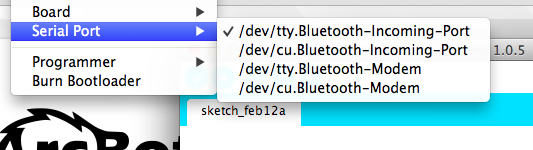
I ran into the same problem. I was plugging into an external USB hub and the “usbmodem” serial ports were not showing.
When I plugged the UBS cable directly into one of the USB ports on the Mac, the modem devices showed
up in the /dev directory. Quit and rerun SparkiDuino. They should now be in the Serial Port list in the Tools
menu.
bash-3.2$ ls /dev/*usbmodem*
/dev/cu.usbmodemfd131   /dev/tty.usbmodemfd131
Your device may have a different number at the end of the device name, but the above ls command will list them for you.
[I am running MacOS X 10.6.8]